QR Stock for Hardware & Paint Shops
Hinges, screws, locks, fittings, tools, paint tins and putty: a hardware and paint shop moves many small items all day, usually with more than one person at the counter. Put a QR sticker on the product, the tin or the shelf bin. Staff scan it, tap add or remove, and every change is logged with a name and a time. Counter staff see what is in stock and what it sells for, and never what you paid.
Where stock goes wrong at a hardware counter
- Small items go fast: a box of screws, a pair of hinges, a tin of polish. Writing each one down never happens.
- Two or three people serve at the counter, and nobody knows who took the last carton.
- A stock-out is discovered when a customer asks for the item.
- Counter staff do not need to know what you paid for each item, but they often can.
- One product has many names: hinge, cabinet hinge, kabja.
How QR Stock fits a hardware and paint shop
-
A tap per item
After the scan there is one screen: choose add, remove or set the count, type the quantity and save. Counter staff can update stock between customers.
-
Cost price stays with you
Each product has a cost price and a sale price. Staff see the stock and the sale price only, and in a live setup the cost price is removed before it reaches their phone.
-
The names customers use
Give a product other names, such as kabja, cabinet hinge or putty. Staff type any of them to find the product when there is no sticker to scan.
-
A low-stock list on your phone
Set a low-stock level for each product. The owner's home screen lists what has reached it, so reordering starts from a list instead of memory.
-
A count you can trust
After a physical count, use Set count to correct a product. The correction is logged like any other change, with who made it and when.
-
Paint by the tin, putty by the tub
Each product has its own unit: pieces, pairs, boxes, tins, litres, buckets or kilograms. Each shade or pack size can be its own product with its own sticker.
What it looks like
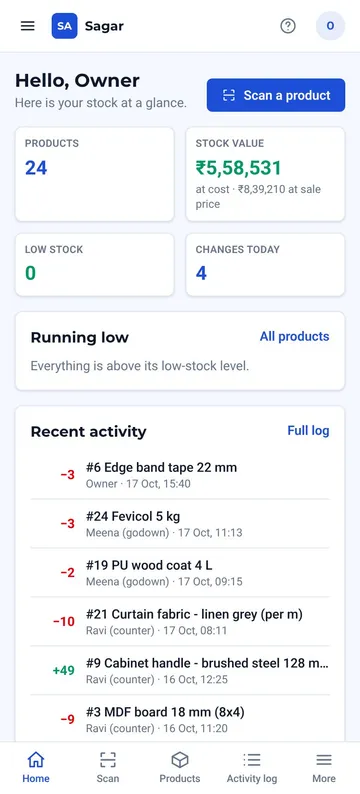
Your shop's name and colours
Stock value at cost and at sale price, what is running low, and the latest changes.
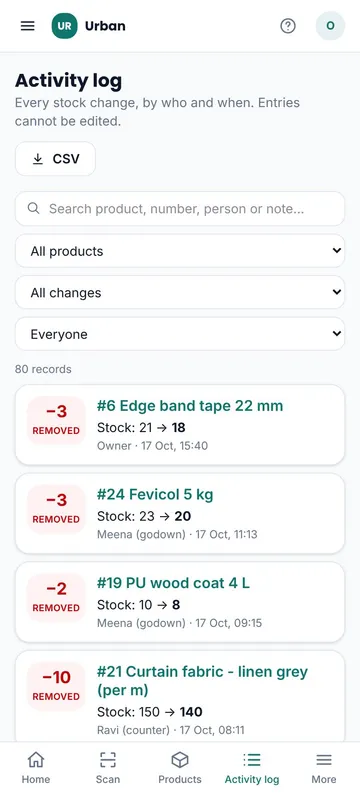
Who took the last carton
Every change with a name and a time. Search by product, person or note.
Try it on your phone
Open the live demo and tap the Sagar Hardware & Paints demo code, then sign in as the owner or as staff with one tap. Add and remove some stock, then open the owner's Activity log to see each change under the staff member's name. To try scanning, open QR stickers as the owner on one screen and scan a sticker with the phone camera. The demo runs in your browser with sample data and sends nothing to us.
Open the live demoPricing
₹50,000 one-time setup
₹5,000 per month, flat
No per-user or per-device fees. Sticker printing and delivery are billed at actual cost. Full pricing and what is included.
What to know first
- It keeps one count per product, not a count for each shelf or branch.
- It needs an internet connection to save a stock update.
- It does not connect to Tally or other accounting software.
Looking at the whole system? See QR Stock & Inventory Management or the QR Stock app page. Also see QR Stock for interior and furnishing shops.
Need a website for the shop too? See our Discoverability Setup package.
Frequently Asked Questions
We stock thousands of items. Is this for us?
It works best on the products you count regularly: fast movers, high-value items and bulk stock. Setup includes QR stickers generated for up to 100 products. Beyond that, sticker printing is billed at actual cost and support for new products is covered by the monthly fee. The software itself has no product limit.
Can counter staff see our cost prices?
No. Staff see the stock and the sale price. The cost price is visible to the owner only, and in a live setup it is removed before it reaches a staff phone.
Can we find a product when the sticker is missing or damaged?
Yes. Staff can type the product number printed under the QR code, part of the name, or any other name you have given the product, such as the Hindi or Punjabi word customers use.
Can we try it before we decide?
Yes. Open the live demo at qr.groverhq.com and tap the Sagar Hardware & Paints demo code, then sign in as the owner or as staff with one tap. Add and remove some stock, then open the owner's Activity log to see each change under the staff member's name. To try scanning, open QR stickers as the owner on one screen and scan a sticker with a phone camera. The demo runs in your browser with sample data and sends nothing to us.
What does it cost?
₹50,000 one-time setup, then ₹5,000 per month, flat, with no per-user or per-device fees. Setup includes QR stickers generated for up to 100 products. Sticker printing and delivery are billed at actual cost, with no markup. The final quote is confirmed after we understand your products and team.
Does it connect to Tally or work offline?
No to both. It needs an internet connection to save a stock update, and it does not connect to Tally or other accounting software: stock is tracked on its own and reconciled with your accounts by hand. Accounting connections can be scoped later.
Ready to stop counting stock by hand?
Message us on WhatsApp. Tell us roughly how many products and staff you have, and we'll reply with scope and a clear quote.
Chat on WhatsApp